
Skip to content
SUQQ
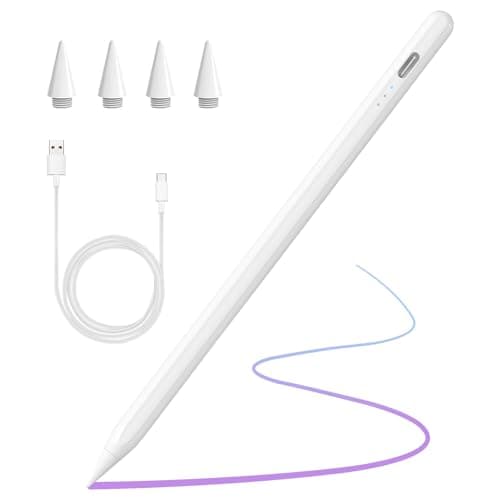
​​​Stylus Pen for iPad 2018-2025 with Palm Rejection, Active Pencil for iPad 10th/9th/8th/7th/6th Generation, for iPad Pro 11/12.9 inch, for iPad Air 5th/4th/3th Gen, for iPad Mini 6th/5th Gen (White)
1 / 6 Hover to zoom

COO

​​​Stylus Pen for iPad 2018-2025 with Palm Rejection, Active Pencil for iPad 10th/9th/8th/7th/6th Generation, for iPad Pro 11/12.9 inch, for iPad Air 5th/4th/3th Gen, for iPad Mini 6th/5th Gen (White)

SKU: Z81A3A5A3BD14A4343399Z

4.6(14)
392+ sold
AED 94.40AED 11619% off

Inclusive of VAT

Hurry — only 1 left in stock!

1

Coupons & Offers

SUQQ GOGet it by Sat, Oct 3

Deliver to Dubai ·

14-day returns — free & easy

Sold by

CLIQNSHOP

Visit Store

Why with SUQQ

  • Secure payment
  • Verified sellers
  • Fast UAE delivery

Payment options

VISAVisaMastercardCOD

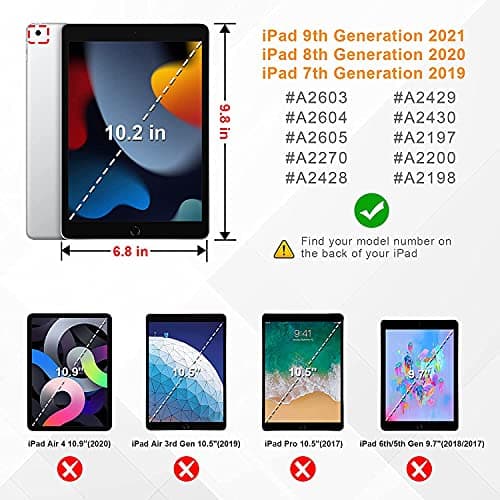
✅【Universal Compatibility】Compatible for iPad 2018 and later versions, including for iPad 11th/10th/9th/8th/7th/6th Generation, for iPad Air 3rd/4th/5th/6th/7th Gen, for iPad mini 5th/6th Gen, for iPad Pro 2018-2025(12.9""/11""). ✩ NOTE: Not compatible with iPad before 2018 and iPad mini 7th Gen, and also not compatible with iPhone, Android and window devices. The IOS system needs to be upgraded to version 12.2 or above to use Stylus normally. ✅【Fast Charging & Long Standby】This stylus pen supports 10 hours of continuous use and 180 days long term standby for only 15 Minutes per charging. It will automatically shut down after idle for 5 minutes to save power. ✅【Tilt Sensitive and High Precisely】The stylus pen for on iPad is sensitive to pressure and tilt, tilt at different angles can draw different strokes of thickness. 1.2mm fine point nib provides precisely and smoothly writing feeling, no noise, no skip, and no lag. ✅【Easy to Connect with iPad】No need to setting Bluetooth or install any apps, just turn on this stylus pen by simply touching the switch on the pencil top for 2 seconds, it will turn on and connect with to iPad automatically. Super easy to use. ✅【Palm Rejection Design】With this stylus pen, when drawing, sketching, and note-taking, no need to keep your hand away from on iPad touch screen or wear gloves. The palm rejection bringing you a real writing experience. ✅【Warm reminder】If it doesn't work, please follow step 1 or step 2 below: ① Go to Settings>Bluetooth>Turn off Bluetooth; ② a. Go to Settings > for Apple Pencil > Turn off ""Only Draw with Apple Pencil"" ② b. Settings > Notes > Turn off ""Only Draw with Apple Pencil""

Frequently bought together

​​​Stylus Pen for iPad 2018-2025 with Palm Rejection, Active Pencil for iPad 10th/9th/8th/7th/6th Generation, for iPad Pro 11/12.9 inch, for iPad Air 5th/4th/3th Gen, for iPad Mini 6th/5th Gen (White)

AED 94.40

TGK Case for OnePlus Pad Lite 11 inch Tablet, Oppo Pad SE 11" Trifold Smart Stand Flip Cover (Blue)

AED 70

Pilot, G2 Pen Stylus, Fine Point 0.7 mm, Pack of 2, Black Ink, Gray Barrel

AED 86.49

Total for 3 items

AED 250.89

More from COO

Similar items

You May Also Like

AED 94.40AED 11619% off