 SUQQ GO
NEXTION
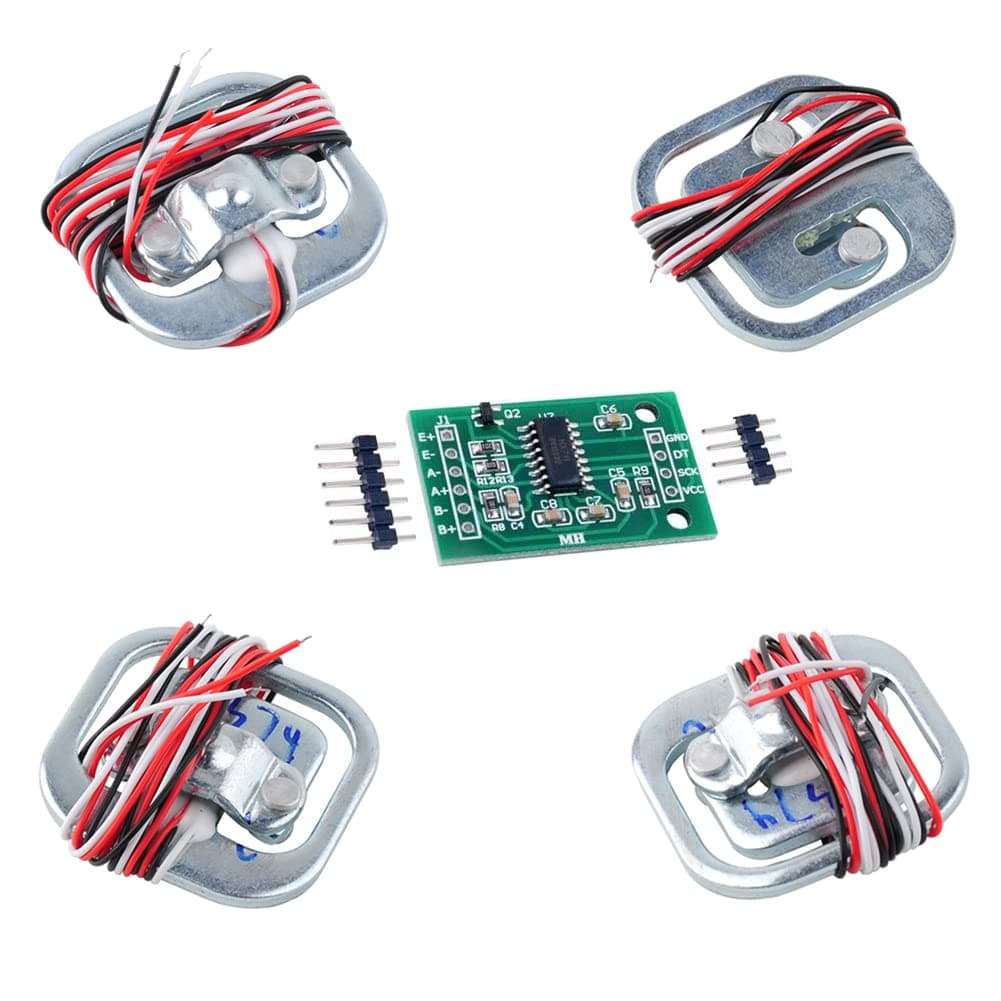
4pcs 50kg Load Cell Half Bridge Strain Gauge Human Body Scale Weight Sensor 1pcs HX711 Amplifier AD Module for Arduino4.8(17)
AED 82.40
Get it by Thu, Oct 1




SKU: Z68920CE8342C9C87E8CCZ
Coupons & Offers
SUQQ GOGet it by Thu, Oct 1
Deliver to Dubai ·
14-day returns — free & easy
6-month warranty — manufacturer-backed
Sold by
Global Store
Why with SUQQ
Payment options
Description: -The Keypad library allows your developmment board to read a matrix type keypad. 44 numeric keypads are most widely used in project which requires user or operator to give command to system or to feed in some data. - Keyboard for the pin interface.4X4 design, 10 numeric keys, 4 English keys,2 function keys. There is a switch connecting each row and column. So the combinations of rows and columns makes up the 16 inputs. - Circuit board is PCB double-panel There is a switch connecting each row and column. So the combinations of rows and columns makes up the 16 inputs. So, try to imagine this. Initially all the switch are open (not connected). When you pressed either one buttons, the switch is now closed (connected). As you can see, now there is a connection between the row and column. Now we know how a matrix keypad works, but how do we relate it with our microcontroller ? So we connect the first 4 pins to the column as INPUT. The other 4 pins is connected to the row as OUTPUT. The input meant that is the input to the microcontroller while output is the output from the microcontroller. Note that the input to the microcontroller has to connect to pull high resistor, or you can use the internal pull up from Arduino itself. For a 44 matrix keypad, usually it has 8 pins on it. How do we know which pins are associate to which rows and columns? A digital multimeter (DMM) would ease your job. Turn your DMM to connectivity mode. Now put one of your meter probe to the first pin and the other one to the fifth pin. Try to press the button and see which button would gives you the beep sound. Next, try to probe to the sixth pin and press other button. Keep trying and you would understand the connection behind the keypad. Finally we have reached to the software part.. Package Included : 1 x 16 keys keypad
AED 63.73
AED 45

AED 41.46
Total for 3 items
AED 150.19
SUQQ GOGet it by Thu, Oct 1
 SUQQ GO
Get it by Thu, Oct 1

 SUQQ GO
Get it by Thu, Oct 1
 SUQQ GO
 SUQQ GO
Get it by Thu, Oct 1

 SUQQ GO
Get it by Thu, Oct 1

 SUQQ GO
Get it by Thu, Oct 1

 SUQQ GO
 SUQQ GO
Get it by Thu, Oct 1

 SUQQ GO
Get it by Thu, Oct 1

 SUQQ GO
Get it by Thu, Oct 1

 SUQQ GO
Get it by Thu, Oct 1

 SUQQ GO
Get it by Thu, Oct 1

 SUQQ GO
Get it by Thu, Oct 1

 SUQQ GO
Get it by Thu, Oct 1

 SUQQ GO
Get it by Thu, Oct 1

 SUQQ GO
Get it by Thu, Oct 1

 SUQQ GO
Get it by Thu, Oct 1
 SUQQ GO
Get it by Thu, Oct 1

 SUQQ GO
Get it by Thu, Oct 1
NEXTION 16 Keys Matrix Keypad 4x4 Membrane Keyboard Module Array Switch for Arduino